Project budgets in hours or money, with alerts in time to act
Sumhour counts each project budget as people log time, warns at 80 percent and again when it is used up, and shows the number in the entry sheet so nobody finds out at the end of the month.
In every plan. 30 days free, no card.
Design passed its 80 percent warning on 28 Oct
Brand site rebuild for Linden & Co has a budget per phase. Design was sold at 100 hours, and the warning arrived with 20 hours still to go, early enough to talk to the client.
The project page shows 64 percent of its 360:00 budget used, with 131:00 left.
How fixed fee projects work| DiscoveryNo budget of its own | 24:00 |
|---|---|
| Design86:30 of 100:00, 87% | 86:30 |
| Build112:00 of 240:00, 47% | 112:00 |
| Client callsBilled by the hour on top of the fee | 6:30 |
| Logged on the project | 229:00 |
Demo workspace: Birch & Row Studio, USD
Budgets in Sumhour, step by step
- 01
Pick what you are counting
On the project form, choose total hours, total amount, hours per task or hours per person. Tick “Budget resets every month” for a monthly one.
- 02
Split it if the work has stages
Add phases such as Design and Build, each with its own hours or amount budget and its own “Warn at %”.
- 03
Log time as usual
The entry sheet shows “Budget: x of y used” under the project and turns amber as the time you are typing takes it over.
- 04
Hear about it in time
At 80 percent, and again when the budget is used up, owners, admins, accountants and the project’s managers get a notification and an email.
See what is left on every project
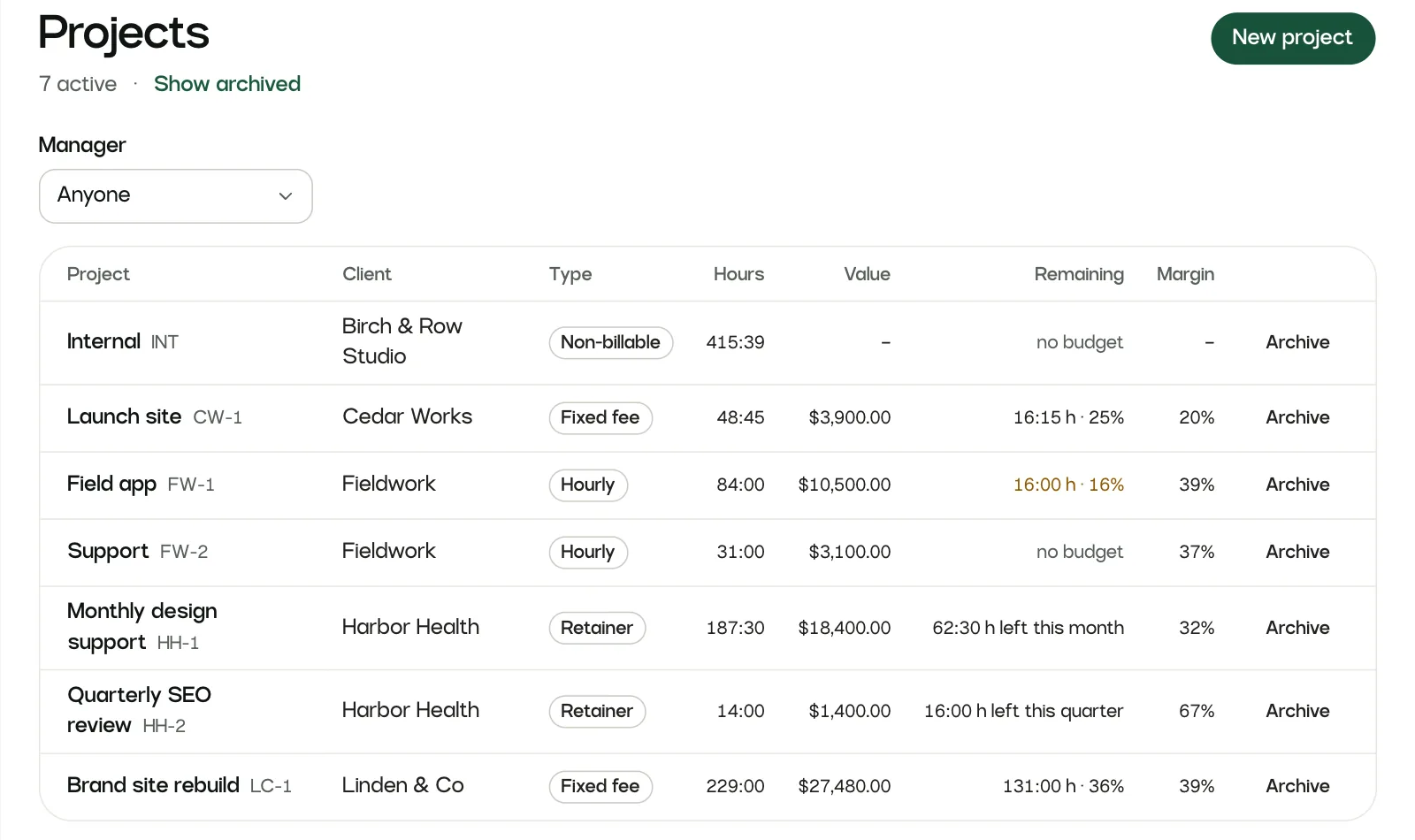
The Projects list has a “Remaining” column: hours and a percentage on a budgeted project, and hours left this month or quarter on a retainer. A project close to its limit turns amber, so one look at the list tells you where to go next.
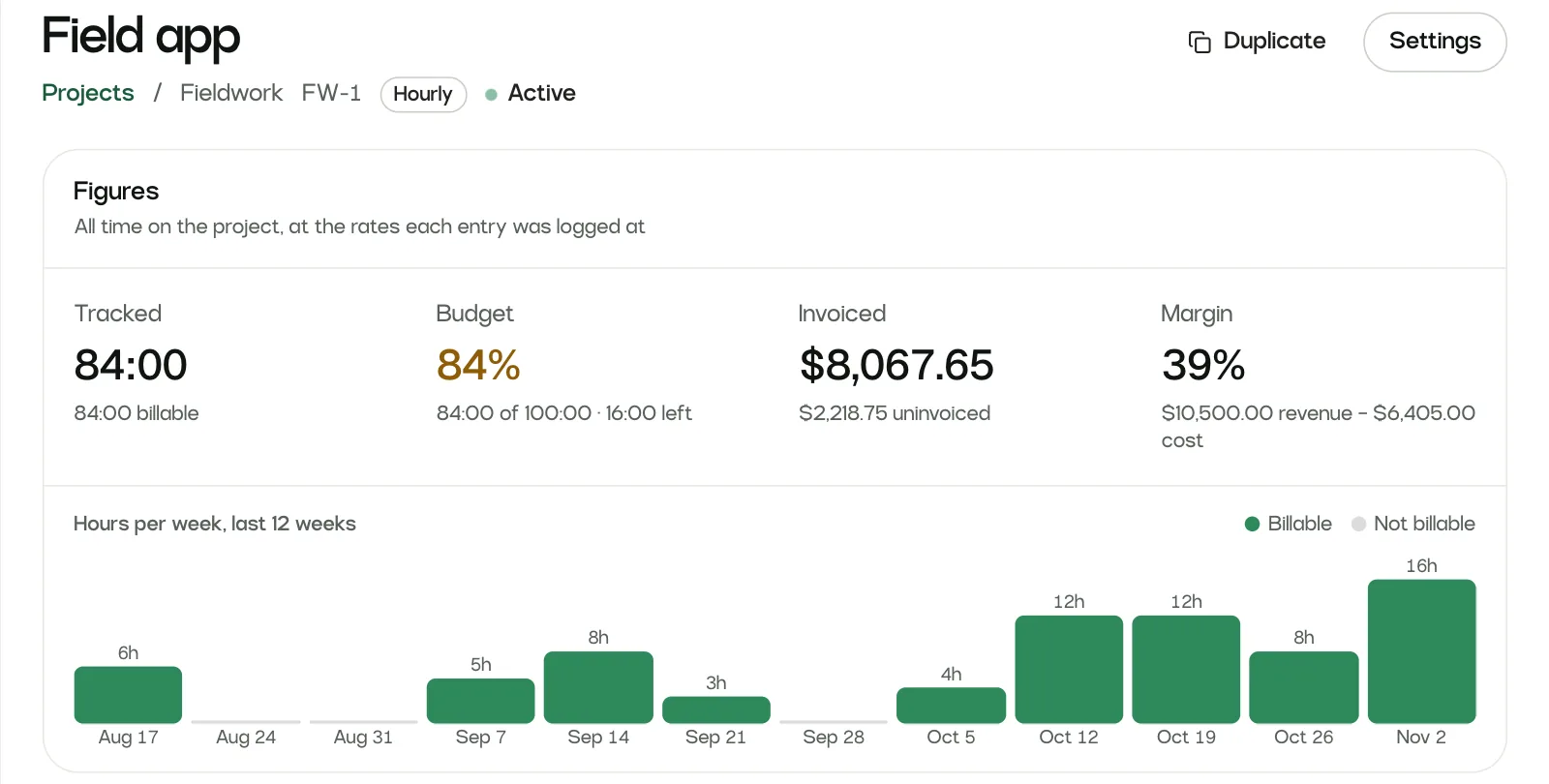
Inside a project, the Budget figure sits beside what was invoiced and the margin.
- Filter the list by manager to see one person’s projects
- Duplicate a project and its budget and alerts come along
A budget for each phase
Projects rarely run over evenly. Give stages such as Design and Build their own hours budget, amount budget or both, and add the fee each phase was sold for to see its margin.
Tasks belong to a phase, so people log time the way they always do and the phase counts it. A phase can warn at a different share from the rest of the project.
Phases in the guidePhases · hours against budget
The warning appears while people type
Most overruns are invisible to the person logging the time. In Sumhour the entry sheet shows the budget under the project, and it turns amber if the hours being typed would take the project over.
The entry still saves. A day with time on an over-budget project gets a mark on its rows, so the conversation can happen this week.
More on time trackingBudget: 86:30 of 100:00 used
Hours14:00Budgets: limits to know about
- A budget warns and never blocks. People can still log time on a project that has run over.
- Sumhour shows what is spent and what is left. It does not forecast the date a budget will run out.
- A budget belongs to a project or a phase. There is no budget across a whole client.
Missing something you need? Write to [email protected]. The person who builds Sumhour reads every message.
Budgets: common questions
How do I set a budget on a project?
Open the project form and go to “Budget and rules”. Choose “Total hours”, “Total amount”, “Hours per task” or “Hours per person”, enter the figure and save. The Projects list then shows what remains on every project.
Budgets in the guideCan a project budget reset every month?
Yes. Tick “Budget resets every month”. The count starts again each month, and each alert goes out once a month.
What does an amount budget count on a fixed fee project?
On an hourly project an amount budget counts billable value. On a fixed fee project hours are not billed, so it counts the cost of the time instead, and hourly extras are left out because the client pays for them on top.
Who gets budget alerts?
Owners, admins, accountants and the project’s managers get a notification, and an email unless they turned it off under Preferences. The warning share is 80 percent unless you change it.
Does Sumhour stop people logging time when the budget runs out?
No. The entry sheet warns as the typed time takes the project over, and the day’s rows get an over-budget mark, but the entry still saves. Stopping someone mid-week would only hide the overrun.
Are budgets in every Sumhour plan?
Yes. Every plan, Solo included, has budgets, phases and alerts.
See pricing
