Agency reports for time, margin, utilization and cash
Sumhour’s reports page answers the questions an agency owner asks each month: where the hours went, which work made money, who has room, what has been paid, and what still has not been billed.
In every plan. 30 days free, no card.
October margin on three billed projects: 40.0%
The Profitability report sets revenue against the cost of the time, from each person’s cost rate. Launch site sits under the 30 percent target, so it gets a label and an amber bar.
Time on a fixed fee project counts as cost as it happens, and the fee counts as revenue when it is invoiced. A project with no October invoice, such as Brand site rebuild, shows cost and no revenue that month.
More on margin and profitability| Monthly design support6,000.00 − 3,120.00, 48.0% | 2,880.00 |
|---|---|
| Field app4,500.00 − 2,700.00, 40.0% | 1,800.00 |
| Launch site, below 30%1,500.00 − 1,380.00, 8.0% | 120.00 |
| Margin on 12,000.00 | 4,800.00 |
Demo workspace: Birch & Row Studio, USD
Reports in Sumhour, step by step
- 01
Pick a report
Time, Profitability, Utilization, Invoicing or Uninvoiced. All five sit on one page as tabs.
- 02
Set the range and filters
Choose a range such as “Last month” or your own dates, a grouping, and a client, project or person where the report has them.
- 03
Save it as a view
“Save view” keeps the report, range and filters under a name the whole team can open from a chip.
- 04
Send it on
Download a CSV, make a public link that hides costs, or have the view emailed every week or month with the CSV attached.
One page, five questions
| Report | What it answers | Group by |
|---|---|---|
| Time | Hours logged, how many were billable, their value and cost | Project, client, task, person, day, week, month, and a second level under each |
| Profitability | Revenue, cost and delivery margin | Project, client, month |
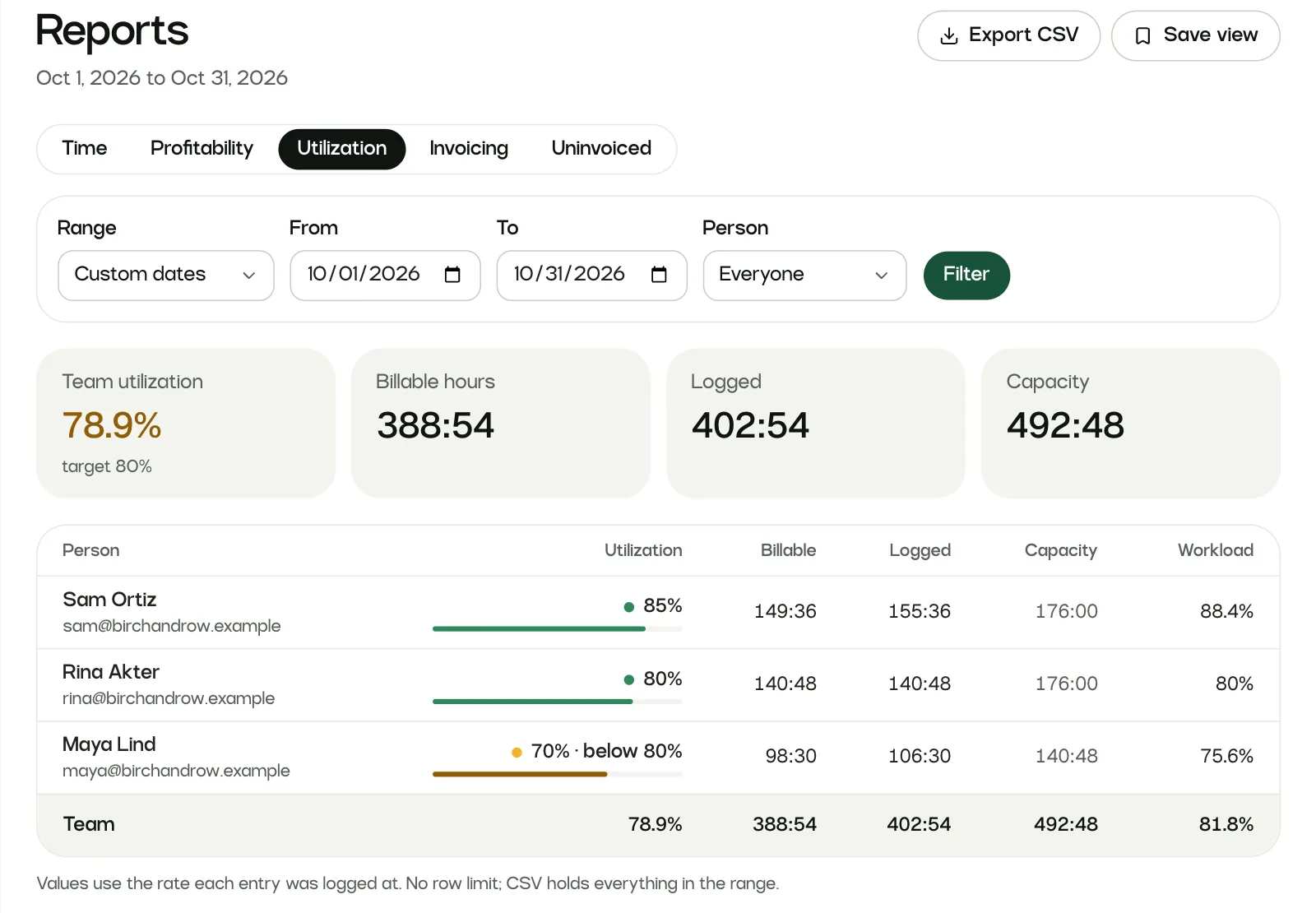
| Utilization | How much of each person’s capacity went to billable work | One row per person |
| Invoicing | What you invoiced, what came in and what is still open | Client, month |
| Uninvoiced | Billable work that has not reached an invoice, however old | One row per project |
Targets that mark what needs a look
Set a utilization target and a margin target under Workspace settings. They start at 80 and 30 percent. A person or project under target gets a label such as “below 80%” and an amber bar, and the “Below margin target” card names the first few.
Capacity is each person’s weekly hours spread over the weekdays, without workspace holidays, and it stops at today so an open month does not count days nobody has worked.
Try the free utilization calculatorProfitability · October 2026
| Project | Revenue | Margin |
|---|---|---|
| Monthly design support | 6,000 | 48.0% |
| Field app | 4,500 | 40.0% |
| Launch sitebelow 30% | 1,500 | 8.0% |
Save a view and send it every Monday
A saved view keeps the report, the range, the grouping and the filters. A preset range like “Last month” moves with the calendar. Everyone who can open reports sees the same list of views.
Add recipients and a saved view arrives by email with the CSV attached, weekly on Mondays or monthly on the 1st.
A public link gives a client live figures with no cost or margin columns, and you can turn it off whenever you like.
Saved views in the guideSave view
Create a public read-only link (no costs shown)
Reports: limits to know about
- Reports export to CSV. There is no PDF export.
- Members and contractors cannot open reports. Managers see figures only for projects they manage, except on the Invoicing report.
- A scheduled email needs a preset range such as “Last month”. Fixed dates are refused, since the same dates every week would tell you nothing new.
Missing something you need? Write to [email protected]. The person who builds Sumhour reads every message.
Reports: common questions
What reports does Sumhour have?
Five: Time (hours, billable share, value and cost), Profitability (revenue, cost and delivery margin), Utilization (billable hours against each person’s capacity), Invoicing (invoiced, paid and still open) and Uninvoiced (billable work not on an invoice yet).
Reports in the guideHow do I share a report with a client without showing costs?
Tick “Create a public read-only link (no costs shown)” when you save a view. The link opens a live read-only page that never shows cost or margin columns, and search engines are told not to index it. You can turn the link off at any time.
Can reports be emailed automatically?
Yes. In the save drawer, set “Email it” to “Every week” or “Every month” and add recipients. Weekly views go out on Mondays and monthly views on the 1st, in the workspace timezone, with the CSV attached.
Do old reports change when I change a rate?
No. Every value uses the rate saved on the time entry when it was logged, so raising a rate today leaves last year’s figures as they were.
Can I export a report to Excel?
Yes. “Export CSV” downloads the report you are looking at, with the same range, grouping and filters and every row, and the file opens cleanly in Excel.
Are reports in every Sumhour plan?
Yes. Every plan has all five reports, targets, saved views, share links and scheduled emails.
See pricing
